How to use Claude Code as a non-developer: a real creative project
You don't need to code: you say what you want and approve each step. My animated reel project with Claude Code: real files, prompts, checks and costs.
 By Gregor13 min read
On this page
You can use Claude Code without writing code: open a folder in the Claude app's Code tab, say what you want, approve its work. I make the animated explainer reels on @valueanimate with Claude Code, in plain English, from script to rendered video. This page shows the real project: its files, prompts, checks, times, costs and what went wrong.
Before this, I animated every reel by hand in After Effects. In this project, Claude Code wrote the tools, and I decide and check. Most guides for non-developers cover the install, a first small task and a starter CLAUDE.md. This one follows a real project I've run since 8 November 2026.
Do you need to know how to code?
No. You need to know what you want and what good looks like, and to say both in plain words.
Claude Code reads the files in the folder you open, writes code, runs commands and installs what's missing. In Manual mode it asks before it edits a file or runs a command (desktop quickstart). The split in my project looks like this:
| Claude Code does | You do |
|---|---|
| Writes and runs the code, the tools and the checks | Say what you want, with an example if you have one |
| Installs what's missing, after asking | Approve or refuse each step |
| Researches, drafts, renders and measures | Judge the result and say what's wrong |
| Writes down what it did in the project's files | Make the decisions that change direction |
For me, the hard part to teach wasn't the code. It was the terminal. My first try at teaching this was a set of video lessons built from real screen recordings. When I watched them, I put them on hold: too much terminal, too technical to follow. So the studio I sell keeps the terminal out of sight. Claude Code runs every command, and you answer questions in plain words.
Set up Claude Code in five steps
Anthropic's docs own the install, and they change, so this is the short version with links.
- Get a paid plan. The free plan doesn't include Claude Code. Pro costs $20 a month ($17 billed yearly), Max $100 and Ultra $200 (Claude pricing, checked 28 November 2026).
- Install the Claude desktop app for macOS or Windows, or the Linux beta, and sign in. The app includes Claude Code, so there's no terminal install (desktop quickstart).
- Click Code at the top of the sidebar.
- Choose Local, then Open folder… and pick one folder for one project. Local means Claude Code works on your computer, where your files and renders live.
- Start in Manual mode. Claude Code shows each change and waits for your yes. Switch to Accept edits or Auto once you trust the routine.
You don't have to use the app. Every way of running Claude Code reads the same CLAUDE.md and settings:
| Where | Best for | What you install |
|---|---|---|
| Desktop app, Code tab | Non-developers: a chat, approve buttons, a view of each change | The app; Claude Code is included |
| VS Code extension | People who already use VS Code | VS Code and the extension |
| Terminal | Scripts and automation | One command per system (overview) |
| Web, claude.ai/code | Code on GitHub, long tasks in the cloud | Nothing, but it can't open the folders on your computer |
The studio I sell is set up for the desktop app on Windows and Mac, and for VS Code on Linux.
Anthropic also makes Cowork, and says "Cowork is built for non-coding knowledge work", such as documents, spreadsheets and slides (Claude Cowork). Claude Code is the one for a project that writes and runs code, like mine.
If a change goes wrong, type /rewind (or /undo) to put Claude Code's file edits back to an earlier request. It doesn't undo what its commands changed, so it's no substitute for a backup (checkpointing docs).
CLAUDE.md: the project's manual
Each session starts fresh, so a project needs a file that Claude Code reads first. That file is CLAUDE.md, in the project folder, and Claude Code loads it at the start of every session (memory docs).
Mine is 155 lines: the mission, a folder map, naming rules and the rules I don't want to repeat. Anthropic suggests keeping each one under 200 lines. Two of my lines, word for word:
**Resuming work?** Read `docs/00-project/NEXT-SESSION.md` first: current state, open questions for Gregor, first actions.

- **Commit and push only when Gregor asks**, every time.
Three habits made it hold up:
- A decision log. Every change of direction gets a row in
docs/00-project/decisions.md, with my reason. There are 107 so far, so a new session can see why a rule exists. - A handoff note.
NEXT-SESSION.mdsays where we stopped and what's open. A fresh session reads it and carries on. - Procedures go elsewhere. Step-by-step work goes into skills, not into
CLAUDE.md. Anthropic's memory docs give the same advice.
The file can also say how to treat you. This house rule is in the starter studio's CLAUDE.md, word for word:
3. **The owner talks, you do the work.** One question at a time, in plain words; one sentence before each step; ask
   before installing anything or spending money; keep the terminal out of sight; never fake a result; keys never in a
   chat or a file.
If you're not a developer, write a paragraph like that before anything else.
Skills: repeat work, written once
A skill is a procedure in a SKILL.md file. Claude Code loads it when your request matches its description, or when you type / and its name (skills docs).
My project runs on two: write-script (a topic to a checked script) and make-video (an approved script to two finished MP4s). This is the top of the first one, wrapped to fit:
---
name: write-script
description: Write a Value Animate animated explainer or story script (Instagram
  Reels / Shorts, 20 s–2:50) from a topic, using the project's Script Bible v2
  ("told for the ear"), the claim ledger, the linter, the first-listen test and a
  fresh-context critic. Use whenever a new video script, hook, or script batch is
  requested for Value Animate.
---
So the request can be one plain sentence, like this one from my build log:
Write a script about why cashews are never sold in the shellClaude Code matches it to the skill and follows its steps: sourced facts first, then the story, then two drafts and the checks.
Skills improve the way a recipe does. After my first batch of scripts, the 13 mistakes the critics kept finding became a self-check inside write-script. Later an audit showed where agents spent their effort, and the video manual went from 614 lines to 149 plus reference files.
Worked example: script to rendered reel
This is one reel's path through the project, in order. Claude Code runs every command. I show a few so you can see what's underneath, not so you type them.
| Step | Claude Code | Me | The check |
|---|---|---|---|
| Facts | 8 to 15 facts, each with a source link | No source for the core fact, no script | |
| Script | The story in time order, two drafts | Read it and approve | Linter, first-listen test, fresh critic |
| Voice | An AI voice, timed word by word | Loudness and timing gates | |
| Storyboard | One frame per sentence | A fresh critic, before anything moves | |
| Animation | A 3D clay world in code, a half-size preview | A collision check, a second critic | |
| Render | Two MP4s, with and without the end ask | Watch it on my phone | QA on format, black frames, sync and sound |
1. Script
write-script builds a claim ledger, then the story, then two drafts. Plain code checks each draft for patterns that sound machine-made:
tools/.venv/bin/python tools/scripts/lint_script.py content/scripts/approved/VA-0038_should-you-jump-in-a-falling-elevator.mdThen simulated listeners hear the script once, one sentence at a time, and retell it. A fresh critic compares the two drafts, and I read the winner last. To try this step on its own, the free Script Kit has a lite version of my script skill and the same checker.
2. Voice and timing
One command makes the voice, masters it and times every word:
tools/.venv/bin/python tools/production/new_episode.py content/scripts/approved/VA-0038_should-you-jump-in-a-falling-elevator.md3. Storyboard and animation
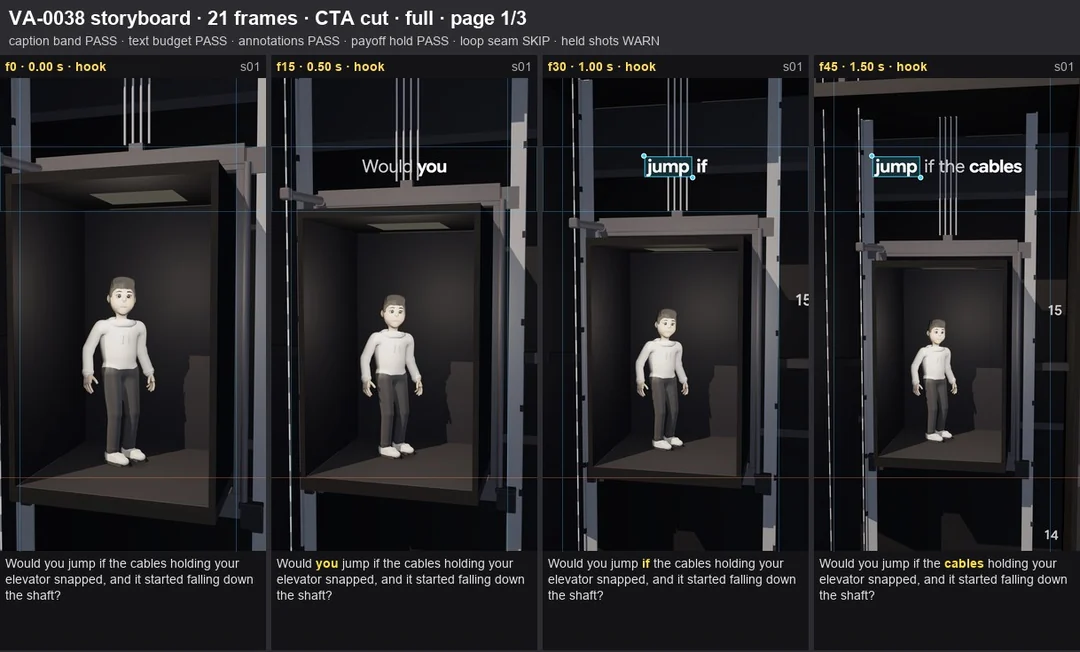
A sheet with one frame per sentence goes to a fresh critic before anything moves. In my latest batch, every storyboard went back at least once. Then an agent builds the 3D world and its cameras, a half-size preview renders, and a second fresh critic watches it.
4. Final render and QA
The render lock makes renders wait their turn, so agents working in parallel don't fight over the computer:
tools/.venv/bin/python tools/production/render_locked.py tools/.venv/bin/python tools/production/render_episode.py va-0038 --summary --share-storyQA checks both cuts. Then the reel goes to a Drive folder with its caption, and I watch it on my phone before it posts.
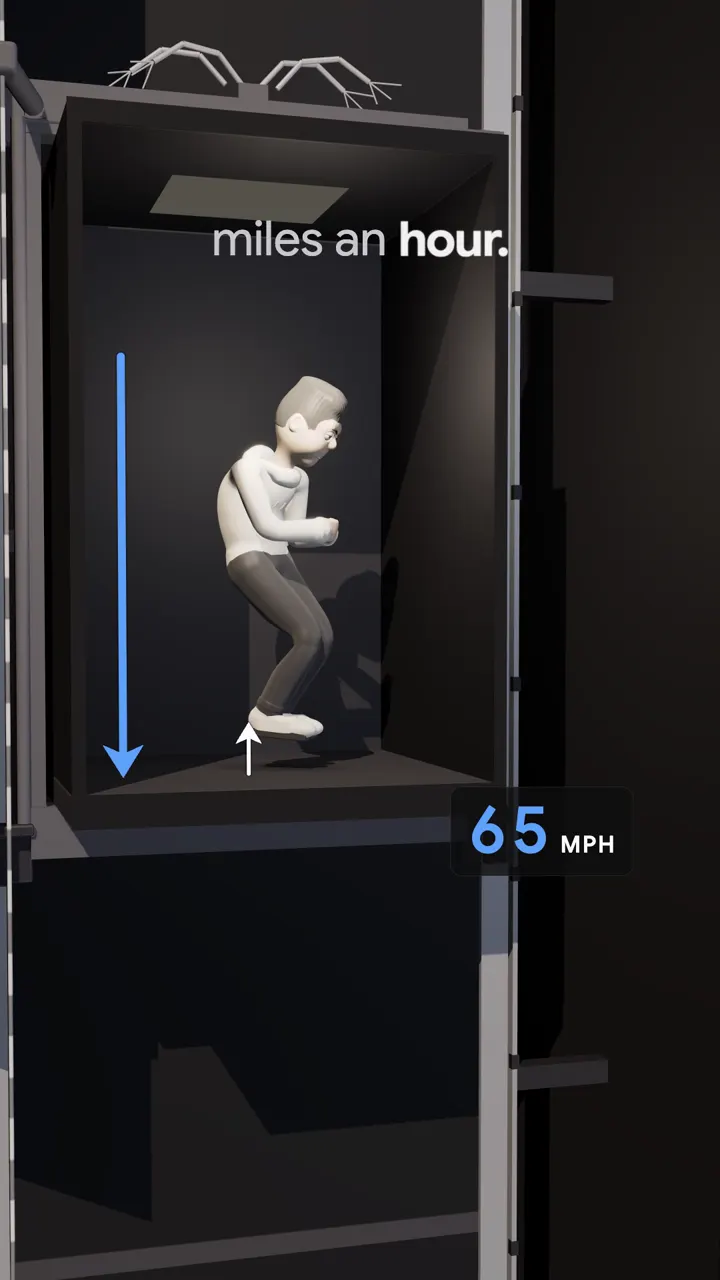
That frame is from should you jump in a falling elevator?, a 52-second reel from my latest batch. Another one to watch is how a gas pump knows when to stop, 33 seconds inside a glass nozzle. Step 1 is covered in depth in my guide to writing an explainer reel script, and steps 2 to 4 in making videos with Claude Code and Remotion.
How do you know the output is good?
You build checks that Claude Code can't talk its way past, and you test the checks first.
- Code that counts. The script checker is plain code, no AI. Its first version, built from best-practice advice, would have failed 86% of Zack D. Films' real scripts. His 3D explainer Shorts are my benchmark. After tuning on real data, that version failed 23% of his top 70 hits and 52% of his flops.
- A fresh pair of eyes. The agent that built a shot believes it works. A new agent that sees only the stills doesn't. In my latest batch of ten reels, the first storyboard reviews averaged about 5 out of 10, and six reels needed a second round of fixes.
- Machines for what machines can measure. QA checks every render for size, loudness, black frames, sync and sound. It can't tell whether a story lands.
- Me, last. An AI judge doesn't get the final word. In one blind test, a judge rated the most-viewed Zack D. Films Short, at 256 million views, 3 out of 10.
What you still decide
The work Claude Code can't take from you is deciding what good is.
- Choose by watching. Claude Code rendered the same 36-second reel in six styles. After watching them side by side, I picked none of them and chose another creator's style as my reference. Later I chose the sound effects the same way, from three versions of one reel. I never choose a look from a description.
- Say no early. I listened to three music versions and rejected all three. Taking the music out took about 3 minutes, because the sound was already one switchable part.
- Listen like a viewer. My first three reels went out and underperformed. When I played them back, I couldn't follow them, although the scripts read well on paper. Every check had read them; none had heard them.
- Approve every script. I read each one before production, after the automated checks have passed it.
What went wrong
These are the failures that changed the system most. Each one is in my build log with its fix.
| What happened | What changed |
|---|---|
| Scripts read well and still lost listeners | A first-listen test: simulated listeners hear one sentence at a time, then retell the story |
| Agents spent 97% of their tokens re-reading their own growing memory | Short-lived agents that read one handoff note, do one stage and stop at a gate |
| 3D parts passed through each other: 16 moments in one reel | An automatic collision check that fails the reel |
| My video lessons were too technical | A PDF and a studio where Claude Code runs every command |
| The delivery tool pasted internal notes into every caption | It now takes only the caption block, and the delivery was redone the same hour |
Smaller traps go into docs/04-production/TROUBLESHOOTING.md as symptom, cause and fix. It has 68 entries so far, from 3D frames that render black to animations that land before their sound.
Can someone else run it?
One test says it can: a clean copy of the studio, run by an agent playing a new buyer, made a finished reel for a niche that isn't mine.
The setup was a new folder from the studio's first release (version 1.0, 25 November 2026), and a Claude Code session with none of my files, skills or memory. That version used Google's voice and listeners; today's studio uses a free voice on your computer and runs the listening test on your Claude plan. The agent played a kitchen-science account for home cooks. The first message was the PDF and one sentence:
Set up my studio.What happened, from the test report (docs/05-funnel/pdf-product/50-fresh-buyer-test.md):
- Setup asked once before installing, then ended on "ready".
- The interview asked 17 questions, one at a time. A person typing the answers would need about 15 minutes.
- Claude Code designed a look for the kitchen niche instead of copying mine.
- One topic became a checked script and a 40-second reel, with every gate run by its tool. That took about 1 hour 35 minutes of Claude Code's work and about 10 minutes of the buyer's. The PDF now plans on about 2 hours, longer on a slower computer.
- The verdict was a pass, with nine required fixes, which the report calls "almost all PDF text or one-line skill changes". At the time, the PDF promised about 5 hours a reel, and the test measured 1 hour 35 minutes. The caption had lost its "Made with AI." line.

The limits, plainly. The test ran on a fast Mac with some tools already installed, so its times are best cases. A second test ran the setup steps on the same Mac with its tools hidden and an empty home folder. With no Homebrew, Node.js, ffmpeg or the studio's Python to find, it reached "ready" in 5 minutes 33 seconds. Neither test clicked through the app's windows, so the Code tab's buttons weren't part of them.
How much does it cost, and how long does it take?
Claude Code needs a paid Claude plan. The rest depends on your tools. In my project, that means Google Cloud for the voice and the listening test.
| What | Cost | Note |
|---|---|---|
| A Claude plan with Claude Code | Pro $20 a month, Max $100, Ultra $200 | The free plan doesn't include it. The studio's advice: Pro to start, Max for a reel a day |
| My reels' voice and listening test | Google Cloud, pay as you go | Google's Gemini: text-to-speech with the Charon voice, and the simulated listeners |
| The studio's voice | Free | It runs on your computer. Google's voice is optional |
| Remotion, the video library | Free for individuals and companies of up to 3 people | Bigger companies need a company license |
| Disk space | About 6 GB free | The studio itself uses about 4 GB |
| Task | Time | Source |
|---|---|---|
| Studio setup | 5 min 33 s on a fast Mac with its tools hidden; the PDF's estimate is 10 to 30 minutes | universal/40-verification.md; the PDF's setup chapter |
| The interview | 17 questions, about 15 minutes of typing | 50-fresh-buyer-test.md |
| A first reel, on a fast Mac | About 1 h 35 min of Claude Code, about 10 minutes of the buyer's | 50-fresh-buyer-test.md |
| Ten of my reels, batch 4 | About 52 hours of agent time in 14 hours on the clock | docs/04-production/batch-04-report.md |
The batch was fast on the clock because up to ten agents ran at once. Big batches use a lot of your plan: those ten reels processed 2.64 billion tokens, the units Claude's usage is counted in, most of them cached reads. Keep the computer plugged in and awake while it works.
Where to start
Start with one folder, a short CLAUDE.md and one task you repeat every week. Once you've explained that task twice, ask Claude Code to turn it into a skill.
To see the rest of my method, read how I make Instagram Reels with Claude Code, the whole workflow from topic to post.
If you want this exact kind of project, AI Animation Mastery is one PDF you hand to Claude Code. It sets up a starter studio on your computer and makes animated explainer reels with you, in a look designed for your niche. It costs $27 and needs a computer (Windows 10 or 11, 64-bit, macOS 15 or newer, Ubuntu 22.04+ or Debian 12+), internet and a paid Claude plan.
How this page was made: I wrote it with Claude from my project's build log, test reports and production files. Every project number on it comes from those files, and both stills are frames from the real renders.
Read next
Can Claude Code make videos? How I make mine with Remotion
Yes, Claude Code can make videos: it writes Remotion code that renders them. How I've made 40 reels with it: commands, render times, costs and what breaks.
20 min read
How to write a script for reels that people follow on one listen
Cut a reel script to one idea, source 8 to 15 facts, open on a picture and test it by ear. My template, and a script that failed six listen tests first.
18 min read
Claude Code for Instagram Reels and YouTube Shorts: my workflow
Claude Code writes, voices and animates my reels in code, about 5 hours of agent time each; I approve and post. The commands, checks, costs and failures.
16 min read