How to make videos with Claude Code and Remotion
Yes, Claude Code can make videos, but not by generating footage. It writes and runs Remotion code: React components that render a video frame by frame. This is the pipeline behind my animated explainer reels on @valueanimate, with the real file names, commands and numbers from the project.
What you'll end up with
A finished vertical reel: 1080×1920, 30 fps, the voice mastered to −14 LUFS. Captions build word by word, a presenter changes pose on the words he acts out, AI stills and code-drawn diagrams share one continuous world, three.js handles the 3D, and sound effects mark the moments that matter. No music.
Two to watch first: are smoke detectors radioactive? (about 30 seconds, built around a 3D ionization chamber) and why GPS needs Einstein (55 seconds, satellites and clocks in one 3D sky).
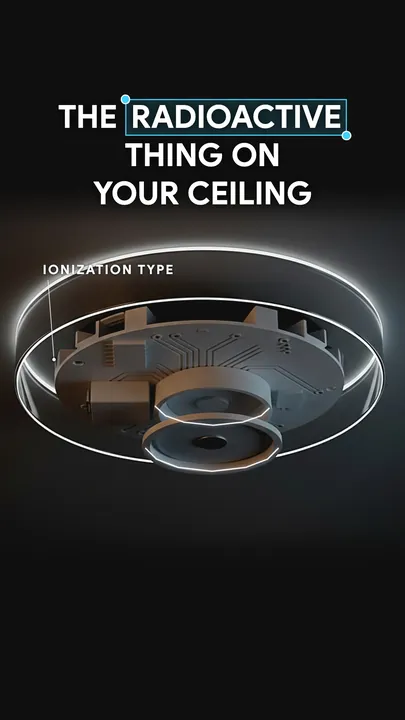
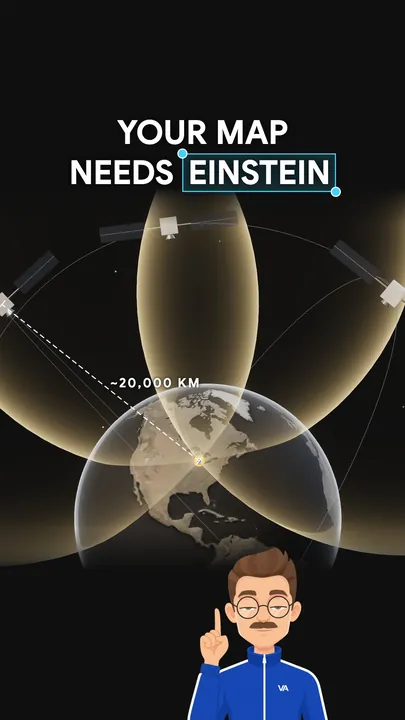
A reel that ends with a call to action renders twice, with and without it, so either version can go out.
Why code instead of an AI video generator
A video model gives you a clip. I needed a house style that holds across hundreds of reels, captions that land on the exact word, and the freedom to change one thing without regenerating everything. Remotion gives me that, because a video is a React component and every frame is a function of the frame number.
- Control. The style is numbers, not a prompt. I measured reference reels I loved: captions in Google Sans at 72 px, camera moves of 11 to 15 frames on one easing curve, a visual change every 0.75 to 0.9 seconds. Code hits those numbers on every frame.
- Consistency. The approved look lives in a library,
production/kit/. I proved the template by rebuilding my approved pilot from it: 53 of 53 test frames came out pixel-identical. - Sync. Captions and pictures read the same word timings, and the plan check flags any pop-in more than 2 frames off its word.
- Cheap changes. Taking the music out was a one-prop change that took about 3 minutes, because sound is a component too.
AI still does what it's good at: Gemini voices the script and draws the stills, and Claude Code writes the code, runs the tools and checks the output. For a first video, Remotion's page on prompting videos with coding agents is a fine start. This page is what it took to go from one video to a series.
The pipeline, step by step
Claude Code doesn't improvise each reel. It follows a project skill, .claude/skills/make-video/SKILL.md, a written procedure from approved script to delivered MP4. (Skills are markdown instructions Claude Code loads when a task matches.) The skill calls Python tools for everything deterministic and leaves shot design to Claude. An episode is a shot plan (shotplan.json) plus stills, on top of the kit.
1. Script
- Claude Code: writes it with my write-script skill: a claim ledger with source links first, then the story in time order, then drafts. Each script carries a beat sheet with one row per shot.
- The check: it must pass the linter (
lint_script.py), a first-listen test (listen_test.py: simulated listeners hear it one sentence at a time) and a fresh-context critic. Then I approve it.
This step decides whether a reel works: my first reels looked right and still underperformed, because the scripts were hard to follow by ear. More in my guide to writing an explainer reel script.
2. Voice
One command starts the episode:
tools/.venv/bin/python tools/production/new_episode.py content/scripts/approved/VA-0011_slug.md- Claude Code: runs it. It copies the episode template, voices the script with Gemini TTS (the Charon voice, plain text, no style prompt) and masters it with
master_voice.py: a 250 ms pause at each sentence end from the script, EQ, −14 LUFS and a true-peak gate. - The check: the master's true-peak gate. If it fails, the fix is a fresh take, never a looser gate.
The master also speeds the voice up 5% and cuts other pauses to 100 ms, which is how my first batch ran. That was about 20% faster than the storyteller I benchmark against, so the plan for the next batch is the voice at natural pace.
3. Word timing
- Claude Code:
prepare_episode.pytranscribes the voice locally with whisper.cpp, then fixes what a raw transcript gets wrong: it takes the spelling from the script, finds each word's onset (when its sound actually hits) and takes the sentence breaks from the master's own record. Output:words.json,beats.json,episode.json. - The check: the printout. The words should match the script, with one beat gap per sentence break.
4. Shot plan
- Claude Code:
new_episode.pyends by writing a firstshotplan.jsonfrom the beat sheet, which already renders as an animatic: real voice, captions, presenter and camera over labeled placeholders. Then the creative work: a hook, body flow and ending from my flow catalogue (8 openers, 8 body flows, 10 endings), a shot type per beat from the kit's 18, and every pop-in pinned to a spoken word. - The check:
shotplan.py checkcatches most mistakes before anything renders: a word that doesn't resolve, a join outside a sentence break, a pop-in more than 2 frames off its word. It also predicts how many camera moves the render will count.variety_check.pyfails a reel that opens or ends like the previous one.
Why that check: my first three reels all opened on a macro photo and ended on a white paper page. Each was fine; together they looked like a template.
5. Stills
- Claude Code: generates them with
gen_image.py(Gemini 2.5 Flash Image). The main subject gets a master still, and every other still of it is an edit of that master, never an edit of an edit.assets.pyupscales, cuts out, aligns and layers them, and each step goes into the episode'sassets.shso the plates can be rebuilt. - The check: every image gets looked at before it's used. My standing note, "gently stylized, not hyper-real", is now the house preset.
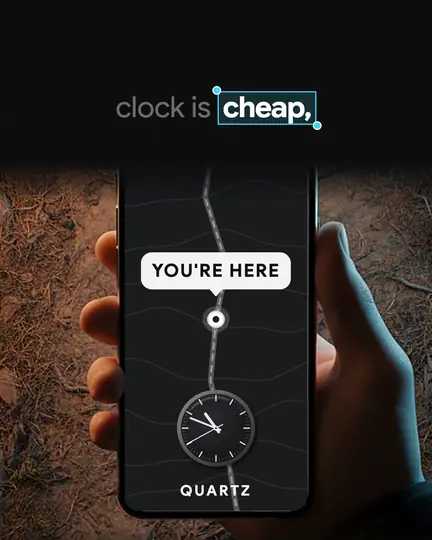
The phone above is a generated photo. Everything on its screen is code, drawn onto corners Claude traced from a labeled grid.
6. Render
- Claude Code: renders at least 15 stills first (
kit/tools/stills.mjs --sheetputs them on one contact sheet), looks at them, fixes what's ugly or off-sync, then renders the reel. - The check: that contact sheet, next to the approved original's.
7. QA
- Claude Code:
render_episode.pyruns the automatic checks below, and Claude traces every number on screen to the claim ledger. - The check: the QA report; then watch it once, in full, with sound.
A shot in code
Here's the core idea in plain Remotion, ready to paste into any project. A shot doesn't hard-code times: it asks the voiceover when a word is spoken and builds every movement around that frame.
import React from "react";
import { AbsoluteFill, Easing, interpolate, useCurrentFrame } from "remotion";

type Word = { word: string; start: number; end: number; onset: number };
const clamp = { extrapolateLeft: "clamp", extrapolateRight: "clamp" } as const;

// A tiny keyword clock: a spoken word -> the frame where its sound starts.
const frameOf = (words: Word[], text: string, fps = 30) => {
  const w = words.find((x) => x.word.toLowerCase().replace(/[^a-z']/g, "") === text);
  if (!w) throw new Error(`"${text}" is not in the voiceover`);
  return Math.round(w.onset * fps);
};

export const AirShot: React.FC<{ words: Word[] }> = ({ words }) => {
  const f = useCurrentFrame();
  const hit = frameOf(words, "air"); // the dot lands on the word "air"
  const ease = Easing.bezier(0.5, 0, 0.15, 1); // one camera curve for every move
  const zoom = interpolate(f, [hit - 1, hit + 12], [1, 2.4], { ...clamp, easing: ease });
  const p = interpolate(f, [hit, hit + 4], [0, 1], clamp);
  return (
    <AbsoluteFill style={{ background: "#0f0f0f" }}>
      <AbsoluteFill style={{ transform: `scale(${zoom})`, transformOrigin: "540px 1010px" }}>
        <div style={{ position: "absolute", left: 510, top: 980, width: 60, height: 60, borderRadius: 30,
          background: "#f9a621", opacity: p, filter: `blur(${(1 - p) * 8}px)` }} />
      </AbsoluteFill>
    </AbsoluteFill>
  );
};
The camera starts one frame before the word, the dot blurs in on it, and the move takes 13 frames on the house curve: the same rule my kit uses.
In the kit, this is the keyword clock (kit/core/clock.ts), and a reel built from kit shots contains no code like this: it's data. A trimmed shot from the smoke detector reel's plan:
{
  "id": "ionise",
  "primitive": "Apparatus3D",
  "join": { "kind": "reveal", "at": "gap:3", "dur": 10, "S": 2.6, "anchor": "point:gap" },
  "events": { "knock": "knock", "current": "current", "smoke": "when" },
  "callouts": [
    { "text": "AIR", "at": "air", "out": "current-4", "target": "molecule", "dx": -110, "dy": 0 }
  ]
}
"gap:3" is the fourth sentence break, "air" is a spoken word, and "current-4" means four frames before "current". The Apparatus3D shot type turns this into a three.js scene with plates, particle tracks and a meter.
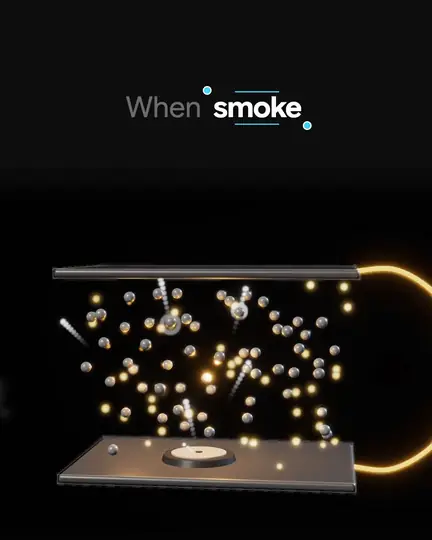
My first two episodes needed hundreds of lines of custom shot code each. Once I folded that code back into the kit as general shot types, both rebuilt from their plans with no episode code at all.
Captions, word by word
Mine sit at the top in Google Sans at 72 px. A phrase of one to six words builds word by word: the spoken word white and bold, earlier words grey, and about one word in six in a cyan box. The component lives in production/shared/captions/. Three rules keep it in sync:
- Text from the script, timing from the transcript.
wordalign.pylines up the script's words with whisper's, so captions say "Ig Nobel", never whisper's "IG Nobel". - Captions follow each word's start; pictures land on its onset. Whisper's start times run 0.1 to 0.35 seconds early on hard consonants. Early text reads fine. An early pop-in looks wrong.
- The boxed words are the keywords. Box and picture land on the same word, so eye and ear agree.
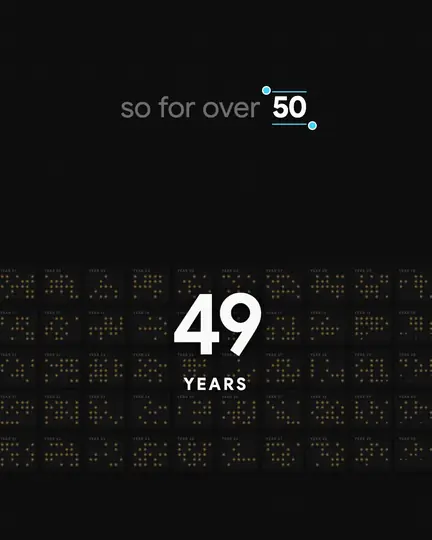
Above, the counter starts 5 frames before "50" and lands 3 frames after it, while the caption boxes the same word.
Sound effects
The house sound is voice plus sound effects. I heard three versions with carefully matched background music and rejected all of them.
- Claude Code:
shotplan.py sfx <id>drafts the cue sheet,sfxcues.json, from the plan: a soft air sound on each camera join, peaking in the sentence break; a near-silent tick on a shot's first callout; an impact on the hook. Cues use the same word expressions as the pictures, so each sound lands with its moment. - The check: that it isn't busy. The rules allow at most two ticks per beat and one low hit per reel, and QA wants the effects about 18.6 LU under the voice.
Most effects are generated in code with ffmpeg; the rest are CC0.
Rendering and QA
Delivery is one command:
tools/.venv/bin/python tools/production/render_episode.py va-0011It checks the plan, renders, mixes voice and effects, writes stems, masters to −14 LUFS with the true peak at or below −1 dBTP, and runs QA. On my Mac that's about 75 seconds, or 1.5 to 3.7 minutes when a reel renders both cuts. A picture-only render takes about 12 seconds for 30 seconds of video. On a Mac, render three.js with --gl=angle.
qa_episode.py checks every render for:
- Format and loudness: 1080×1920, 30 fps, the exact frame count, −14 LUFS ±1.
- Black frames: none, including a single-frame flash.
- Timing and sync: word timings that agree with the audio, and pop-ins within a median of 1 frame of their words. A deliberate 3-frame shift fails, which is how I know the check works.
- Pacing and sound: camera moves per minute against the plan's prediction, and the effects' level under the voice.
What goes wrong, and how I fix it
Each of these hit a real episode and is logged in docs/04-production/TROUBLESHOOTING.md as symptom, cause and fix. After each batch the fixes go back into the template, with proof that finished reels still render the same (258 of 258 test frames after the first batch).
3D frames render black
The usual <EffectComposer> from @react-three/postprocessing builds its composer after the first render. Remotion advances the three.js renderer exactly once per frame, so the composer doesn't exist yet when the frame is captured. My fix, kit/three/SyncEffects.tsx, builds the composer in useMemo and renders it in a priority-1 useFrame. A rarer cause: a shader's pow() of a value a hair below zero returns NaN, and bloom spreads that pixel over the whole 3D window. Clamp the base.
Pop-ins land a little early
In one take, whisper put "pop" at 3.56 s; the sound hit at 3.90 s. Sync impacts to the onset, not the start. Worse, word times can drift 0.1 to 0.5 seconds across a take, and my QA passed it: it compared the picture with the same wrong timings. One agent spent 22 minutes re-timing 102 words by hand. Now wordtiming.py re-times a drifted take on its own: on that reel, words within 2 frames of the checked truth went from 32 of 102 to 74.
"Version mismatch" errors
Every @remotion/* package must match remotion exactly. Mine are pinned without ^ (4.0.541), and an upgrade means bumping them together and re-rendering the pilot to compare.
Time, and what you pay for
Measured on one Mac, from my production logs:
| Stage | Time |
|---|---|
| Voice, mastering, word timing | 16–45 s per reel |
| Stills | in the background while the plan is designed; 6–13 per reel |
| Full delivery: render, mix, master, QA | about 75 s; 1.5–3.7 min for both cuts |
| One reel, start to finish | 33–80 min of agent time, median about 47 |
The time goes into shot design and, for a new mechanism, new code. My first batch was ten reels in one evening: seven producer agents, four at a time, about 2 hours elapsed for 7.4 hours of agent time, and no human minutes until review.
Besides your computer, you pay for a Claude plan (for Claude Code) and Google Cloud, pay as you go, for the voice and the stills. Remotion is free for individuals and companies of up to three people; larger companies need a company license.
Where to start
Start with the script: no render saves a story that's hard to follow. The free Script Kit has a lite version of my write-script skill for Claude Code, the script checker and three annotated scripts. The sister guides cover writing an explainer reel script and making Instagram Reels with Claude Code.
For the whole pipeline, the course is at /#offer. Its Video Pipeline part (lessons from Mon 30 Nov) covers the production side of this page, including the animation kit, the episode template and designing your own presenter in 27 poses. If you'd rather have explainer reels made for your brand, see /brands.
How this page was made: I wrote it with Claude from my project's production docs and build log, and a separate Claude agent checked it against them. Every project number on it comes from those files.